Tools and Libraries Porting Guide
IQ9 has integrated the tools and libraries commonly used in development. If the tools needed during development are not integrated, refer to the following method of cec-client porting:
cec-client porting
1. First, set up the cross-compilation environment. For detailed steps, refer to Install cross-compilation tools.
``shell source <your toolchains directory>/environment-setup-armv8-2a-qcom-linux ``
2. Download libcec source code:
``shell git clone https://github.com/Pulse-Eight/libcec ``
3) Go to the cec-client source directory and execute the code:
``shell mkdir build cmake .. -DCMAKE_INSTALL_PREFIX=../bin make ``
After the make command is run, the following error occurs, indicating that the p8-platform library is not available.
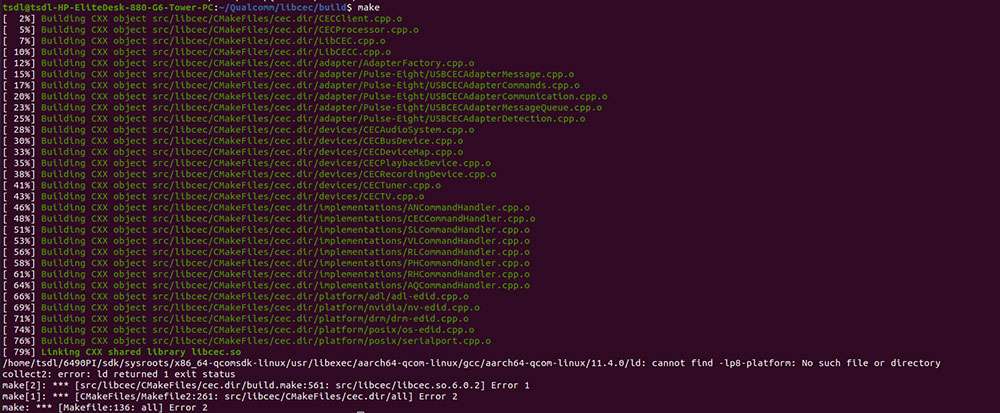
To solve the problem, cross-compile the p8-platform library.
1. Download p8-platform source code:
``shell git clone https://github.com/Pulse-Eight/platform ``
2. Go to the platform folder and run the following commands:
``shell mkdir build cmake .. -DCMAKE_INSTALL_PREFIX=../bin make ``
3. Go to the bin directory and copy the compilation artifact to the sysroot directory of the cross-compilation toolchain. As shown in the following code, /home/zhy/QCOM/sdk is the installation path of the cross-compilation tool. For details, refer to Compile code.
``shell cp libp8-platform.a /home/zhy/QCOM/sdk/sysroots/armv8-2a-qcom-linux/usr/lib/ ``
4) Go back to the libcec directory and continue compilation:
``shell cd libcec/build make ``
5) After the compilation, run the following command to export the compilation artifact to the bin directory:
``shell make install ``
6. Run the following commands to view the compilation artifact. The cec-client tool has been generated, and the libcec library has been integrated into IQ9. Transfer cec-client to IQ9 for execution.
:::note
Transfer files using the ADB or SCP method. :::
```shell cd ../bin/bin ls
file cec-client-6.0.2 ```
